Sending offline events from Bitrix24
to Google, Facebook and Instagram
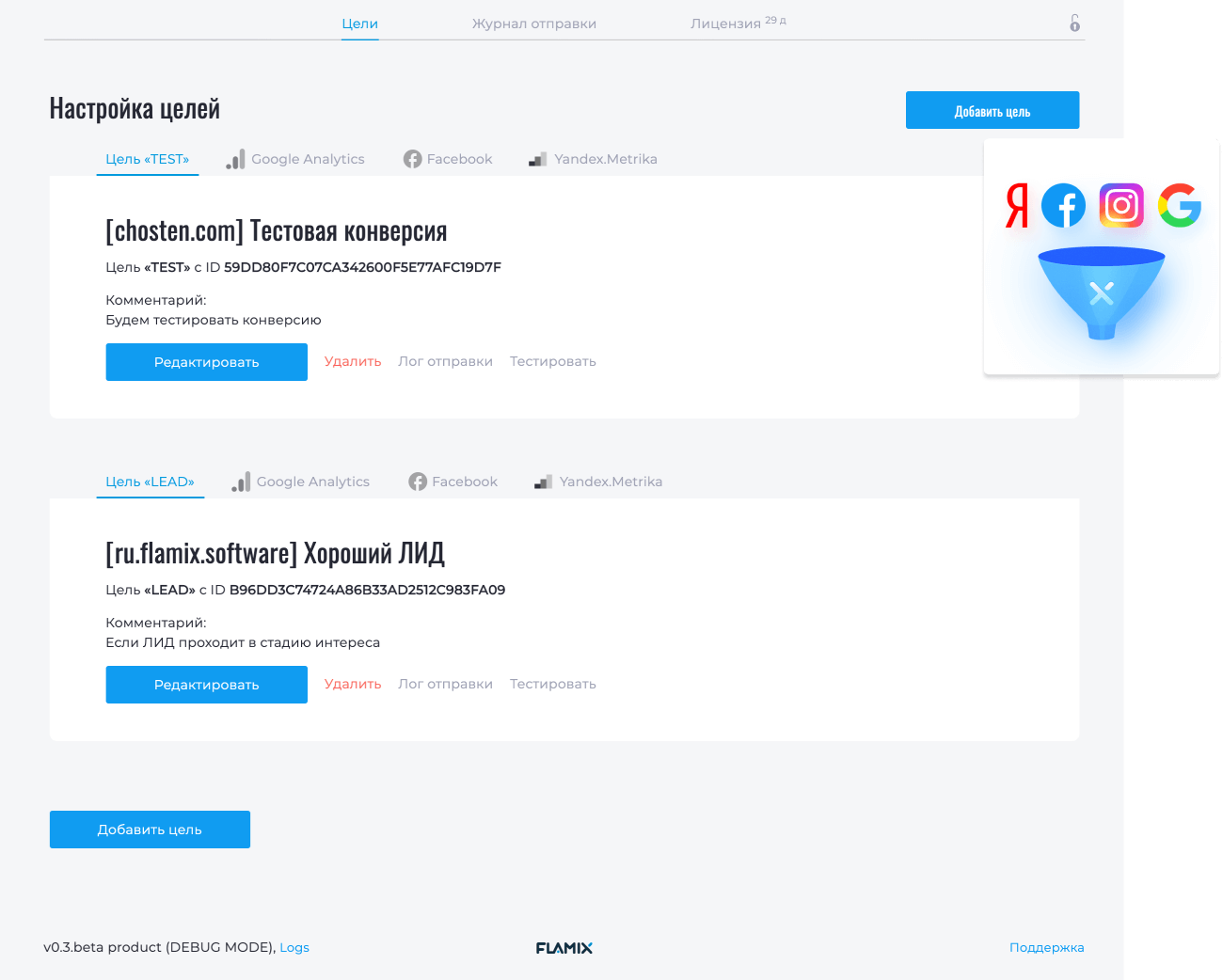
Why you need to send Offline Conversions
Conversion is the ultimate goal of commercial projects. By passing the conversion, you learn the
algorithms of the advertising platform, what kind of leads they buy and how much money they
bring, i.e. automatically generate the target audience (TA). Based on this information,
advertising platforms give preference to your ad if the Lead fits the description of the target
audience and is profitable. Properly trained Artificial Intelligence (AI) selects target audience
several times more efficiently than a person (marketer or business owner).
The two most effective types of campaigns, ROI and pay per conversion, require you to pass on the
conversion and its cost. A nice bonus is the formation of advanced statistics based on conversions
for reports. All you need
to effectively advertise on autopilot is to integrate the advertising platform with your CRM.
Read the article: How to automate and improve advertising on Google, Facebook and Instagram.
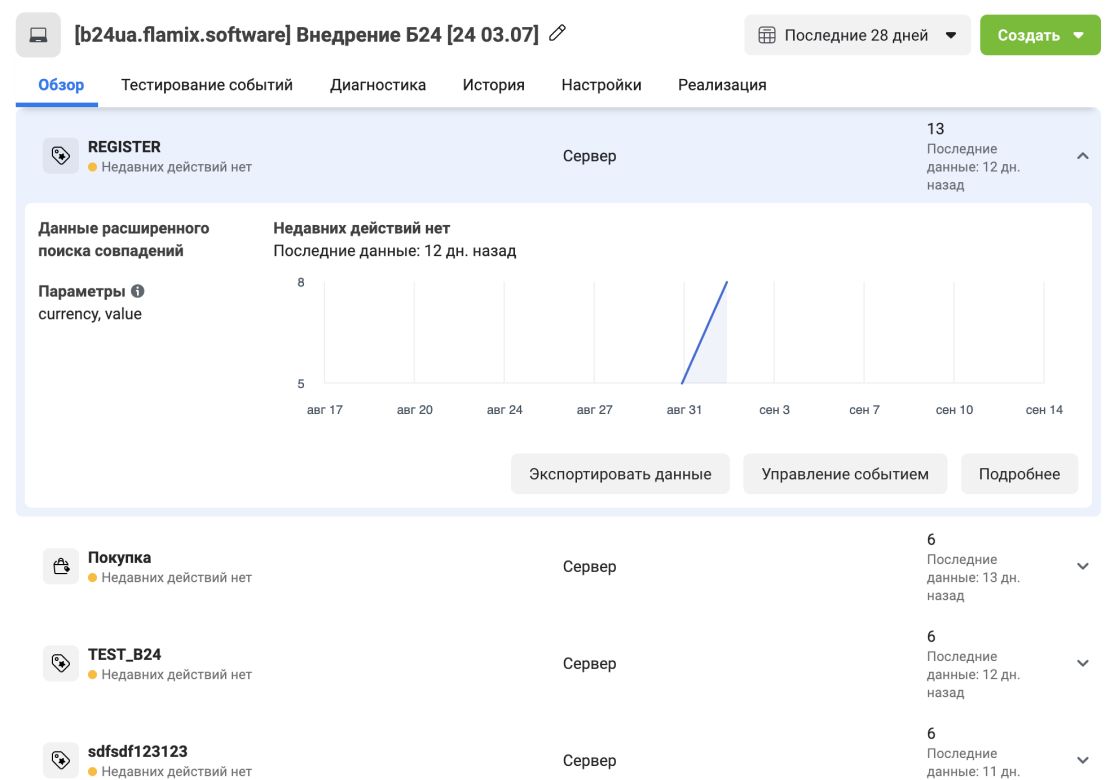
Facebook Events
Send the desired events using the plugin and the Facebook Conversion API, passing the unique visitor ID from the Facebook Pixel.
You can pass cost and currency to events to determine the value of a conversion.
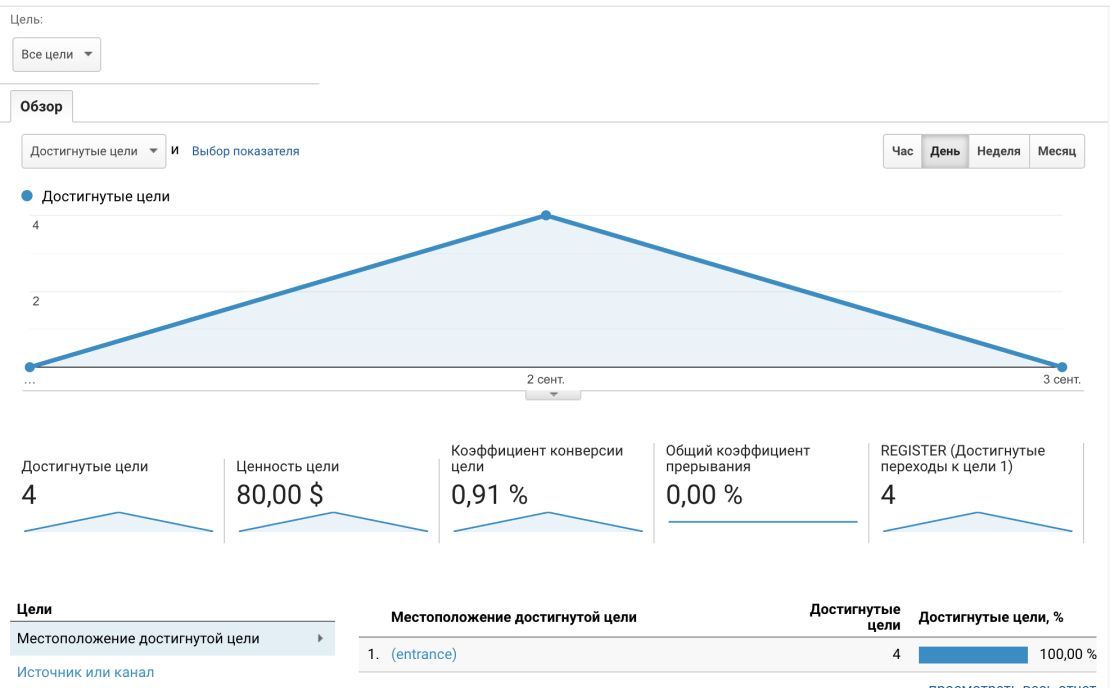
Google Analytics Events
The plugin sends events and transactions (if the goal has a price) to Google Analytics (GA) linked to the user. Events are displayed in real time, transactions with a delay of 1 hour. There are no restrictions on the number of events.
When submitting a cost, you can specify a currency that will automatically be converted to the currency of your GA account.
Install
The module is available as part of the subscription Flamix.Bundle.
🔥 Maximize your business efficiency and convenience with a subscription to all Bitrix24 apps, reducing costs by up to 80% while gaining access to a comprehensive suite of business tools.
 Instructions for installing and activating a trial.
Payment Methods

Details about payment methods. Have questions - contact us.
- Private cloud or on-Premise
- Custom Development
- Premium Support
- No limits
- Product Training
- Maximum performance
Сначала протестируйте, а потом покупайте. Каждый наш модуль имеет бесплатный тестовый период 30 дней. На время тестирования вы получите полноценную техническую поддержку.
API
Integrate any system to get even more information about customers.
<?php
use \Flamix\Conversions\Conversion;
try {
    Conversion::getInstance();
    Conversion::setCode('YOR_CODE')->setDomain('example.com');
    Conversion::add('UID', 150, 'USD');
} catch (Exception $e) {
    $e->getMessage();
}
?>
curl --location --request GET \
'https://conversion.app.flamix.solutions/api/conversion/add/YOR_CODE' \
--data-urlencode 'DOMAIN=example.com' \
--data-urlencode 'uid=UID' \
--data-urlencode 'price=150' \
--data-urlencode 'currency=RUB'История версий
Current stable version — master, 31.03.2026
The app works in the cloud and updates automatically.
- Update UI
- Update UI
- Update UI
- Google, FB and TikTok env
- Repeat
- Yandex oauth
- UI fix
- Updgrade dev verson
- Update UI
- Add Support Chat
- Build UI
- DB external
- Test DB
- Remote DB
- Update PHP and templates
- Fix svg icon
- New DB server in payment
- Storage = simlink
- New Deploy
- New DB
- UTC time
- Refactoring
- Chenge add convertion func
- Change main UI to separate
- YM: Change icon
- YM: Config
- pay scope
- Update general UI
- robots.txt
- Fix deleting
- Now auto delete old conversion log (more then 3 month)
- Update UI
- FB PXID
- Model refactorig and bug fix
- Fix install in safari
- Fix pagginations
- Small fix
- Add user24 to all web route
- Delete log from journal
- Typo
- Update JS
- Update UI && Remove logs
- New app24_route support
- auto install
- Change timezone
- Fix api route
- SettingController refactoring
- Setting save fix
- Update UI
- Start new app24-core refactoring
- Add manually throtle
- New Middelware
- Update Ketnel (Middelware fix)
- Github autodeploy
- GA4Controller - Refactoring code.
- GA4: Now work with GCLID
- Refactoring
- Delete old Google Connector
- Laravel 10 updated
- Small changes
- Fix bug
- Update deploy
- Core, Redis and Memcached
- Remove Universe Analitycs from UI
- Update UI and Core
- Update Envoyer
- New Error Handler
- Optimize Notify User settings
- Core fix return
- Git TMP fix
- Product envoy
- Add new Core
- Add new Envoy
- Fix journal
- Envoy update
- Update Envoy
- Add new themes to pay
- New License
- Delete old theme folder
- Add Логин: MOBI
- How to choose Event code
- New themes UI
- New themes
- Add FAQ & Step-by-step guide
- Remove external_id
- Fix PRODUCT_ID 0
- Fix Journal pagenav
- Add video to FB, GA4, GA and Y.M
- System will merde Lead and Contact Data
- Small fix
- FB: Now sending locations and Birthday
- FB now sent external_id
- GA4 Fix
- Add force upload
- Remove placement
- Fix FV error
- Menu rename
- Add IP to Facebook
- Remove old GA4 setting func
- Full GA4 Support
- Refactoring && Fix notify users
- Big refactoring! And finishe FB integrations
- Receiver from B24 refactoring
- Refactoring RobotController
- Refactoring ConversionModel
- Refactoring FB event to new format and new Controller
- Move HTTP to independed
- Add basic FB tests
- Add fields when open app in first time && Refatoting Views
- Add translate, refactoring and change env() to config()
- Change setting to notify
- Add error_log to gitignore
- Update YMetrica conversion packege
- Add Laravel v9 composer script
- Minimum PHP 8
- Update to Laravel v.9
- Update UI to new version
- Remove conversion packege
- Update bugs handler
- Update UI
- Update JS library
- Add product to bugging
- Fix bugging
- Add bugging mode
- Fix bug with notify
- Fix bug when send notify
- Fix bug when send notify
- Delete LOG
- Fix conversion error
- Fix bug with Google Anal
- Fix bug
- Add Pay Version
- Add Pay Version
- Refactorin, change FB version, add new document_id to google
- Better clear GA
- JS Bugs and Not Admin User Bugs
- Fix error with google ID
- Add translate
- Fix bug when add placement
- Dont sent ctransaction, if dont need
- secure:Delete Robot when deleted conversion
- Add Placement
- Fixed error
- Refactoring and add Google fiches
- Add Contact and Product Functional
- Refactoring & Add Notify
- Route to L8
- Update UI framework
- secure: Update to php 8
- secure:Update Laravel to 8
- secure: Dont loop robot
- Start refactor
- Update FB version
- Remove test data
- Add sDump
- Fix GA Problem
- Add new Error Handler
- Ignore some handler
- Fix bug with Admin reverse access
- Update FB version
- Optimize CSS and JS
- Add Envoy Deployment
- Opechatka
- Change admin tooltip access to dynamical
- Global Session
- Add auto renewal messages
- Add debugger
- Moving Kassa to B24 Packeges
- License problem
- Send error to Telegram
- Fix payment
- Add Flamix.Kassa
- Add Languages
- Add inv example
- Remove composer.lock from git
- Change Metrika Package
- Change Metrika packages
- Change Yandex Metrika Integrations (optimize)
- Add Lang, change some route
- Error MSG
- Change interval to Uploading
- Fix uploading to FG & GA
- Hide Admin icon on MSG
- Payments fix
- Add Logs, change some UI
- secure: Merge with gitignore
- secure: add gitignore
- Merge
- Change License and Pay
- Add Views
- Server
- Api ready
- Init
Передача конверсий
Покупка и поддержка
- Перейдите на страницу модуля и найдите блок «Установить»;
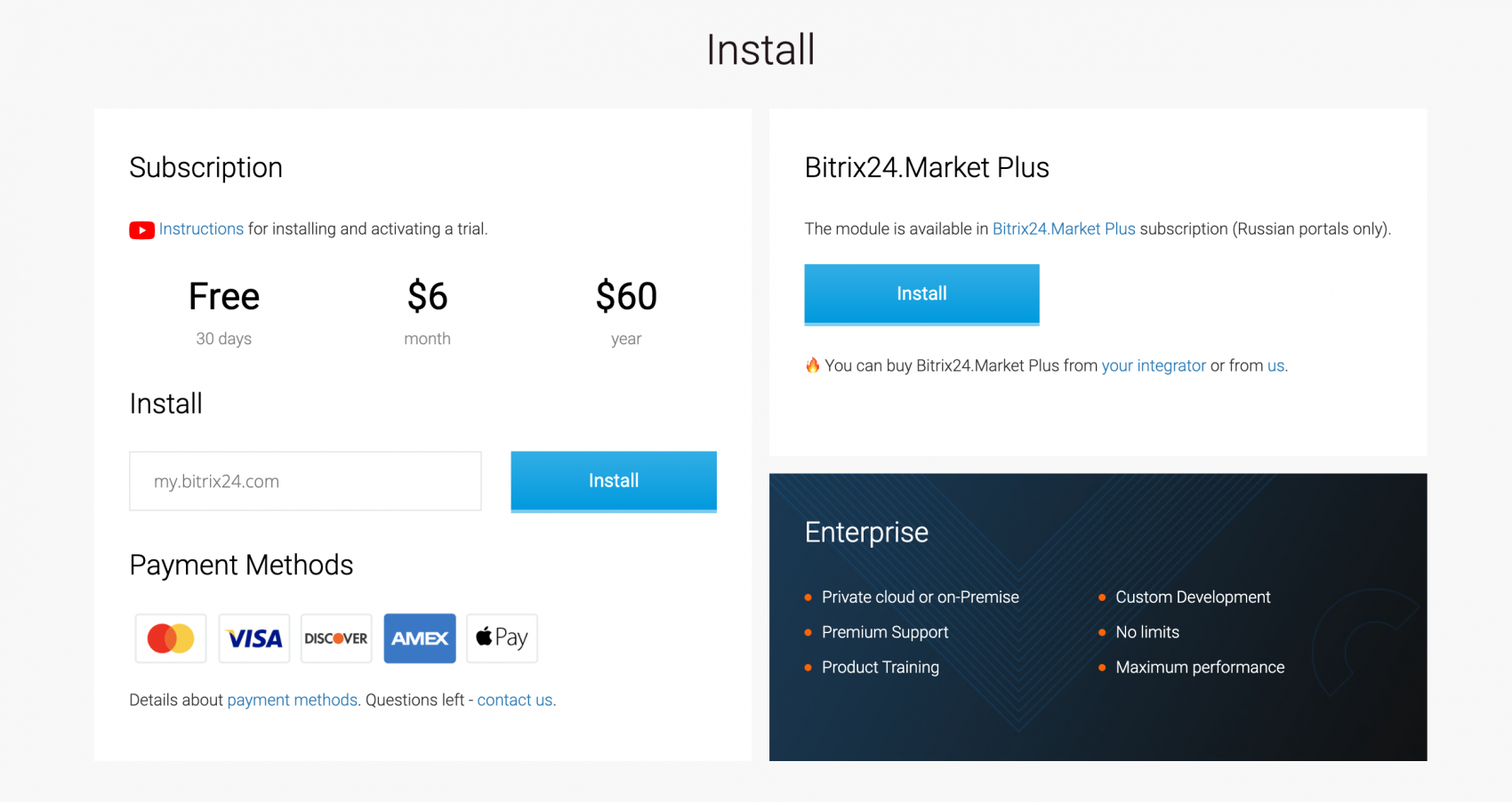
- В поле рядом с кнопкой «Установить» введите домен вашего портала Битрикс24 и нажмите кнопку «Установить»;
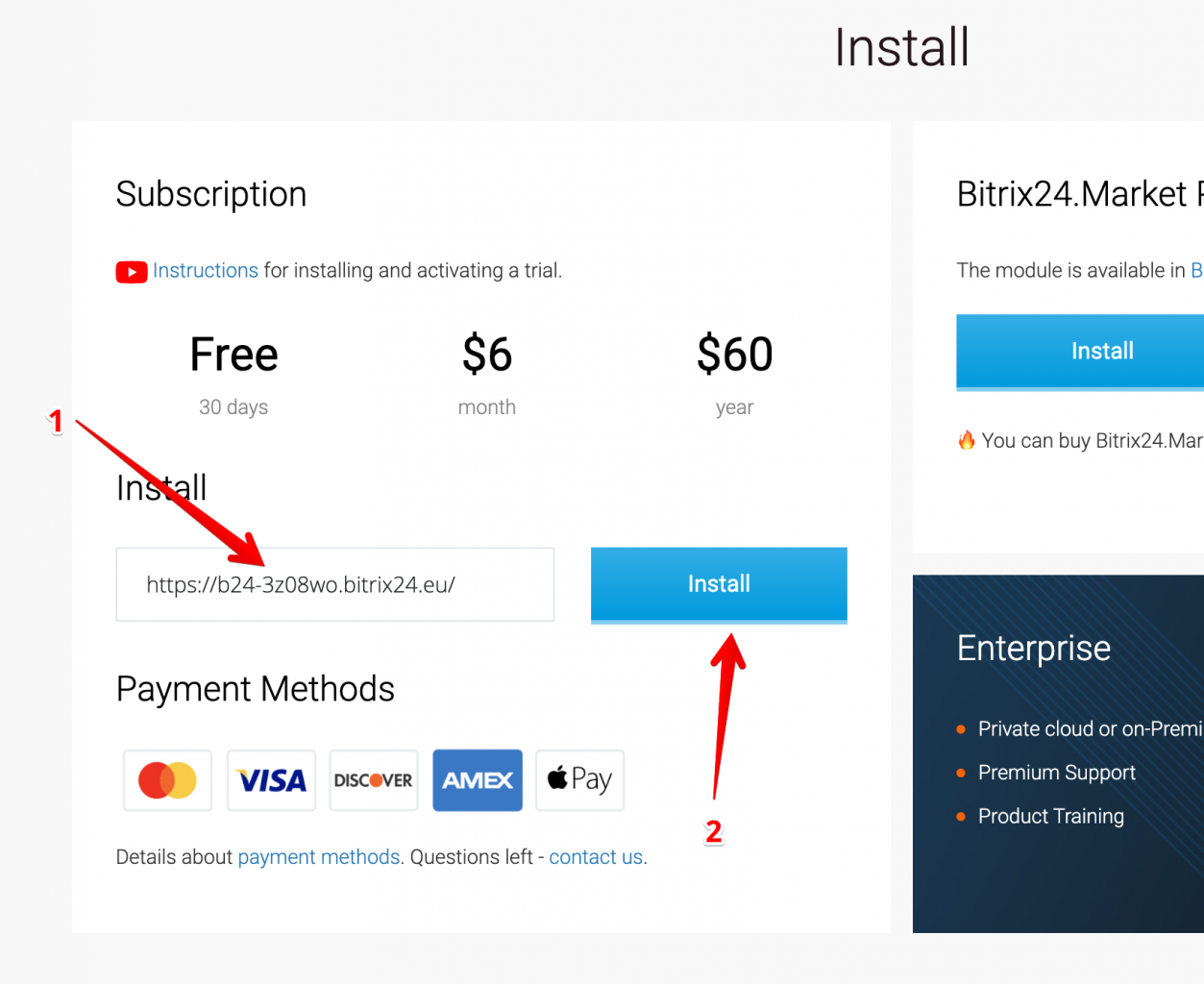
- Примите все соглашения и нажмите "Установить";
- Нажмите кнопку "Начать бесплатную пробную версию" (1) или вставьте свой лицензионный ключ (2), если он у вас есть;
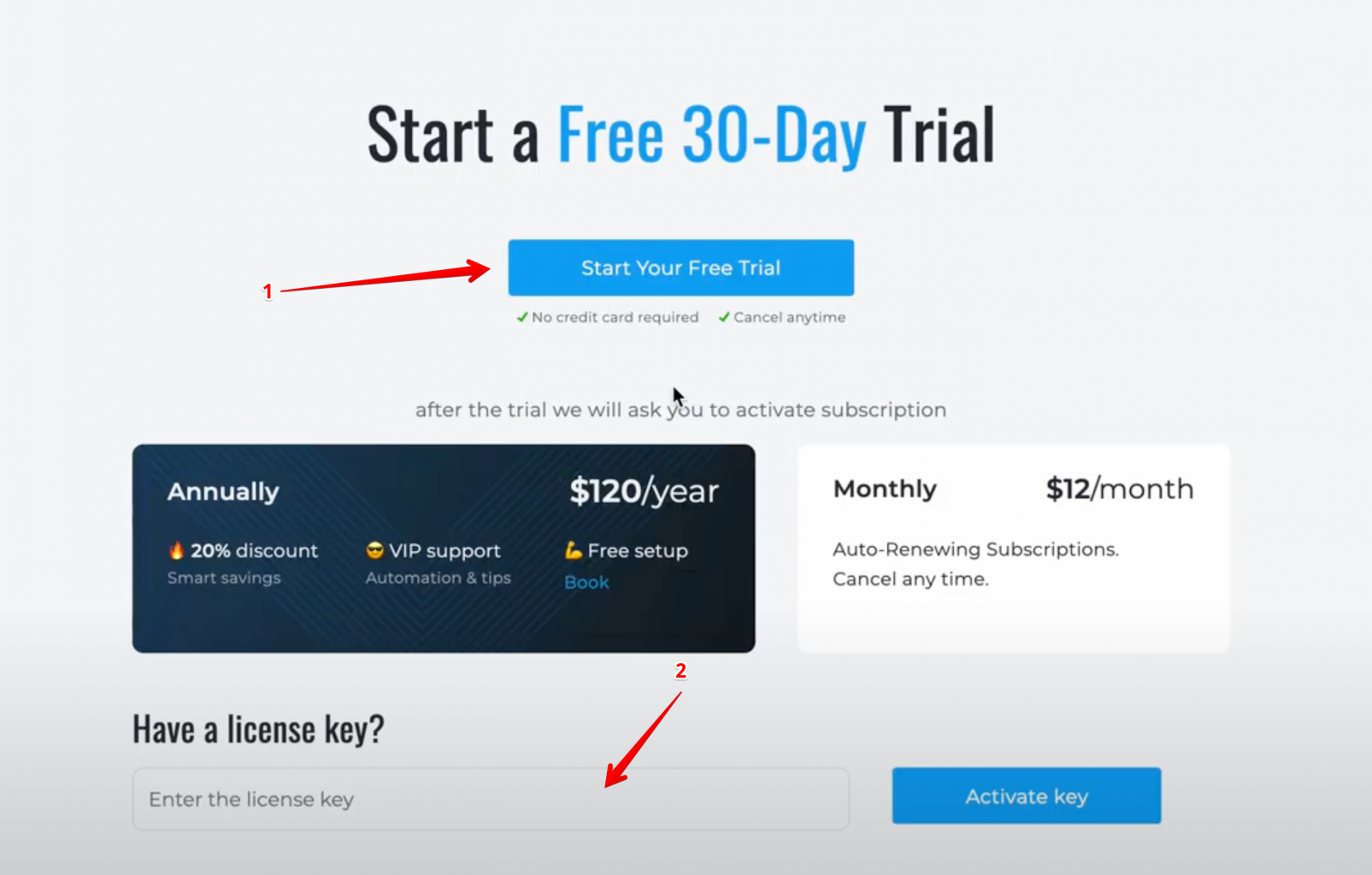
- Если вы активировали пробную версию, обязательно введите свой действующий адрес электронной почты, на него мы отправим лицензионный ключ (проверьте спам, если вы его не получили).
- Откройте приложение на портале Битрикс24, перейдите на страницу «Лицензия» (1) и выберите нужный период подписки (2).
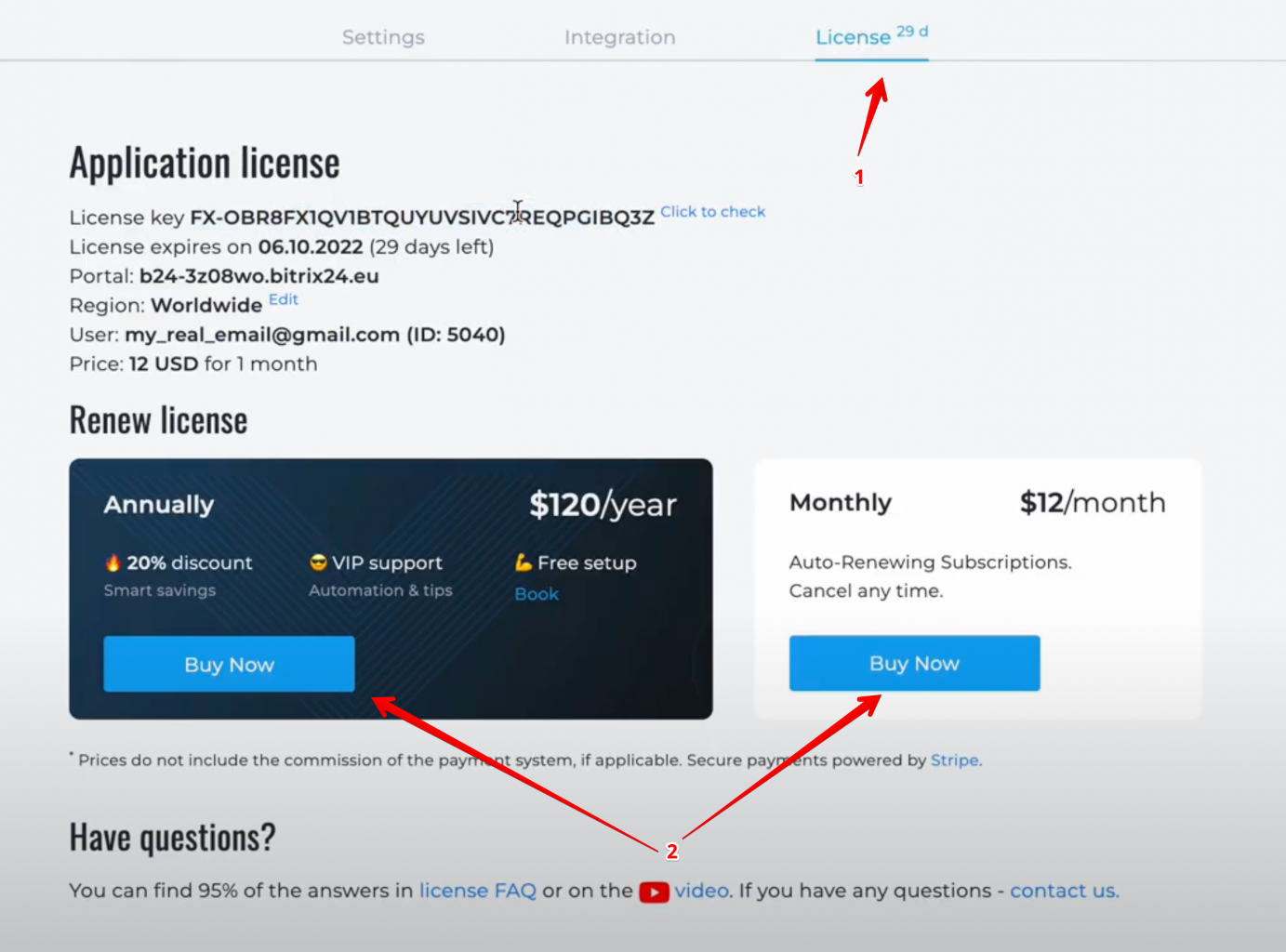
- Перейдите на страницу проверки лицензии — https://flamix.solutions/license/ (1) и введите лицензионный ключ (2), нажмите кнопку «Проверить» (3). Если лицензионный ключ правильный, вы увидите кнопку «Продлить» внизу (4).
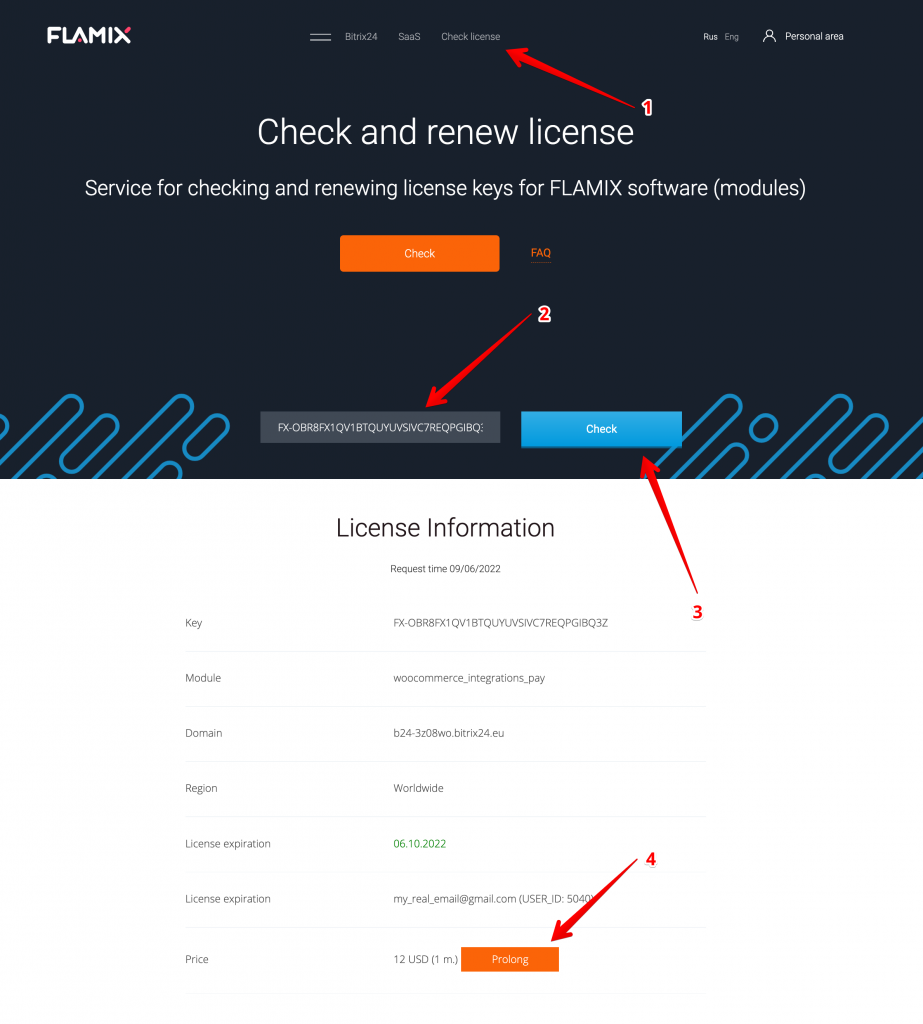
Когда что-то идет не так или вам нужно отправить логи в поддержку, вам нужно выполнить следующие действия.
- Откройте приложение и прокрутите вниз;
- Нажмите ссылку "Logs".
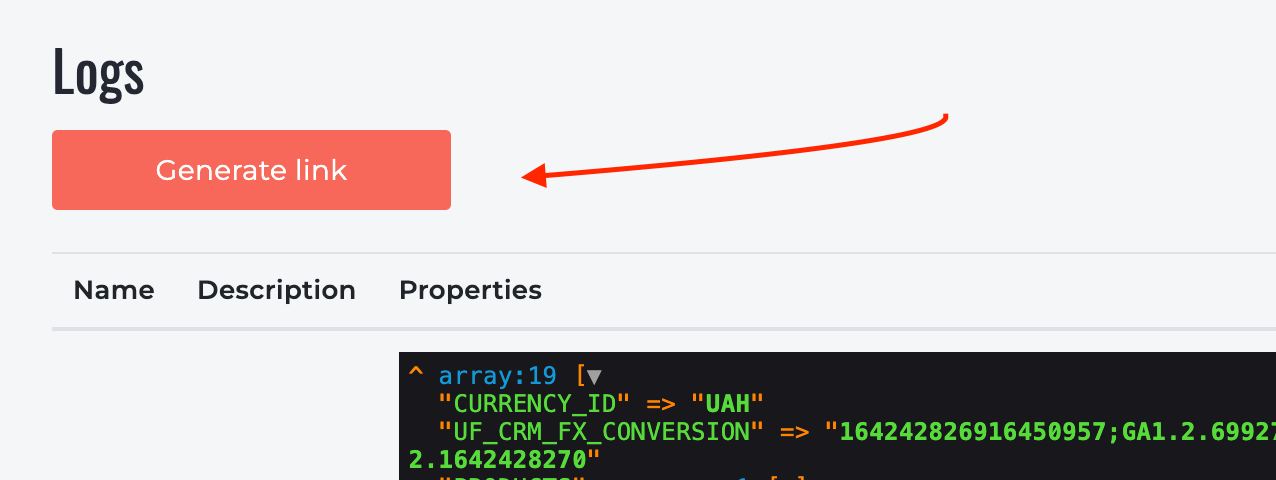
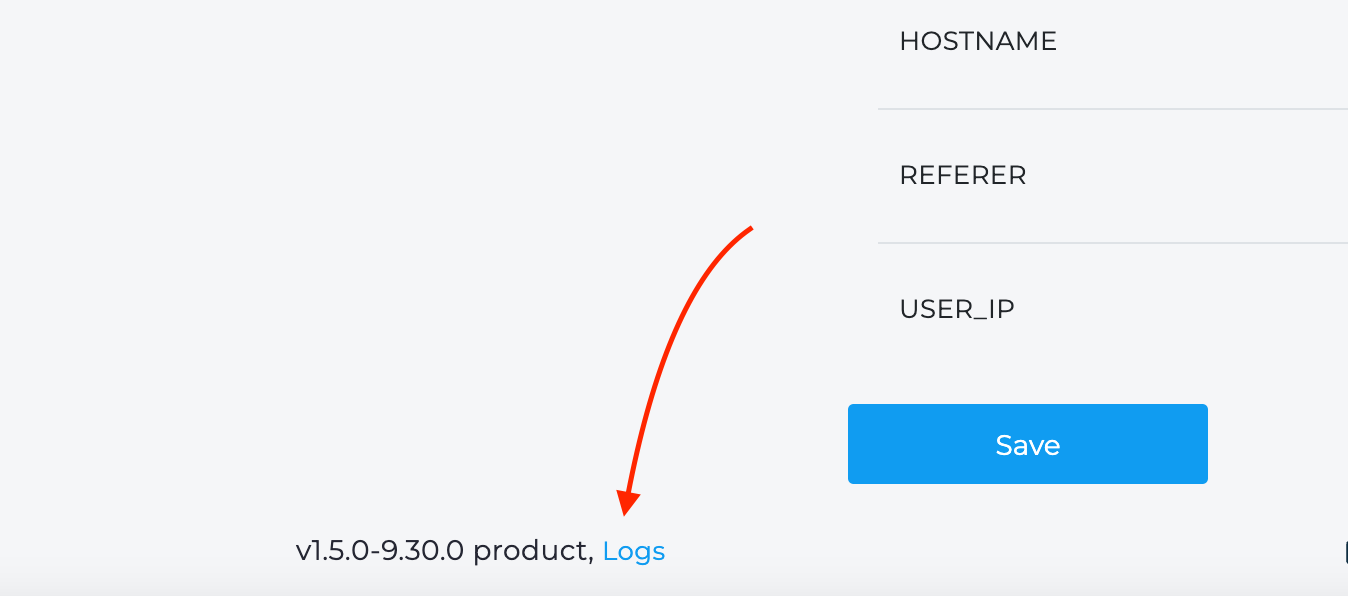 Здесь вы можете увидеть всю информацию, которую мы регистрируем. Если вы технический специалист, вы можете проверить журналы и найти проблему.
Кроме того, мы иногда запрашиваем ссылку на логи. Чтобы сгенерировать ее, просто нажмите кнопку "Создать ссылку". Скопируйте и отправьте нам эту ссылку. Ссылка действительна 2 дня.
Лицензия Enterprise требуется в следующих случаях:
- Вы регулярно совершаете более 500 обращений к подключаемому модулю в день;
- Нам нужна модификация плагина Битрикс24 для вас;
- Вы хотите чтобы программа работала на ваших серверах.
Реализация
- Подписываем NDA и сервисные контракты;
- Мы выделяем для вас отдельный VPS;
- Настройка окружения, развертывание репозитория с плагином (если нужна поддержка и обновления);
- Высылаем отдельные сборки плагинов для CMS или настраиваем интеграцию сами;
- Организуем мониторинг и поддержку 24/7.
По вопросам приобретения пишите любым удобным способом.
Важно! Мы не передаем код клиенту.
Настройки
Please, watch this video tutorial - https://www.youtube.com/watch?v=5S85eypIZtM
Please, watch this video tutorial - https://www.youtube.com/watch?v=2OBF7oLz-8g.
Please, watch this video tutorial - https://www.youtube.com/watch?v=qPoUvWcBSdI.
Please, watch this video tutorial - https://www.youtube.com/watch?v=t1zbpcH8VN8. List of standard events:
Спасибо за доработку и оперативное исправления багов!
Очень удобно пользоваться - от установки, до покупки! Надеюсь на стабильную работу в будущем.
Единственное приложения для телеги, которое стабильно работает. Так держать!
Решения легко настраиваются и интегрируются. Сэкономили нам много времени! Спасибо!
Благодарю за отзывчивую поддержку ваших приложений. Всегда можно получить нужную помощь.
Стабильность и надежность ваших приложений для Битрикс24 не перестают нас радовать.
Топовые ребята! Технически и дизайнерски все на высоте. Скорость поддержки нужно подтянуть :)